Chain Table #
Chain table is a new capability for primary key tables that transforms how you process incremental data. Imagine a scenario where you periodically store a full snapshot of data (for example, once a day), even though only a small portion changes between snapshots. ODS binlog dump is a typical example of this pattern.
Taking a daily binlog dump job as an example. A batch job merges yesterday’s full dataset with today’s incremental changes to produce a new full dataset. This approach has two clear drawbacks:
- Full computation: Merge operation includes all data, and it will involve shuffle, which results in poor performance.
- Full storage: Store a full set of data every day, and the changed data usually accounts for a very small proportion.
Paimon addresses this problem by directly consuming only the changed data and performing merge-on-read. In this way, full computation and storage are turned into incremental mode:
- Incremental computation: The offline ETL daily job only needs to consume the changed data of the current day and do not require merging all data.
- Incremental Storage: Only store the changed data each day, and asynchronously compact it periodically (e.g., weekly) to build a global chain table within the lifecycle.
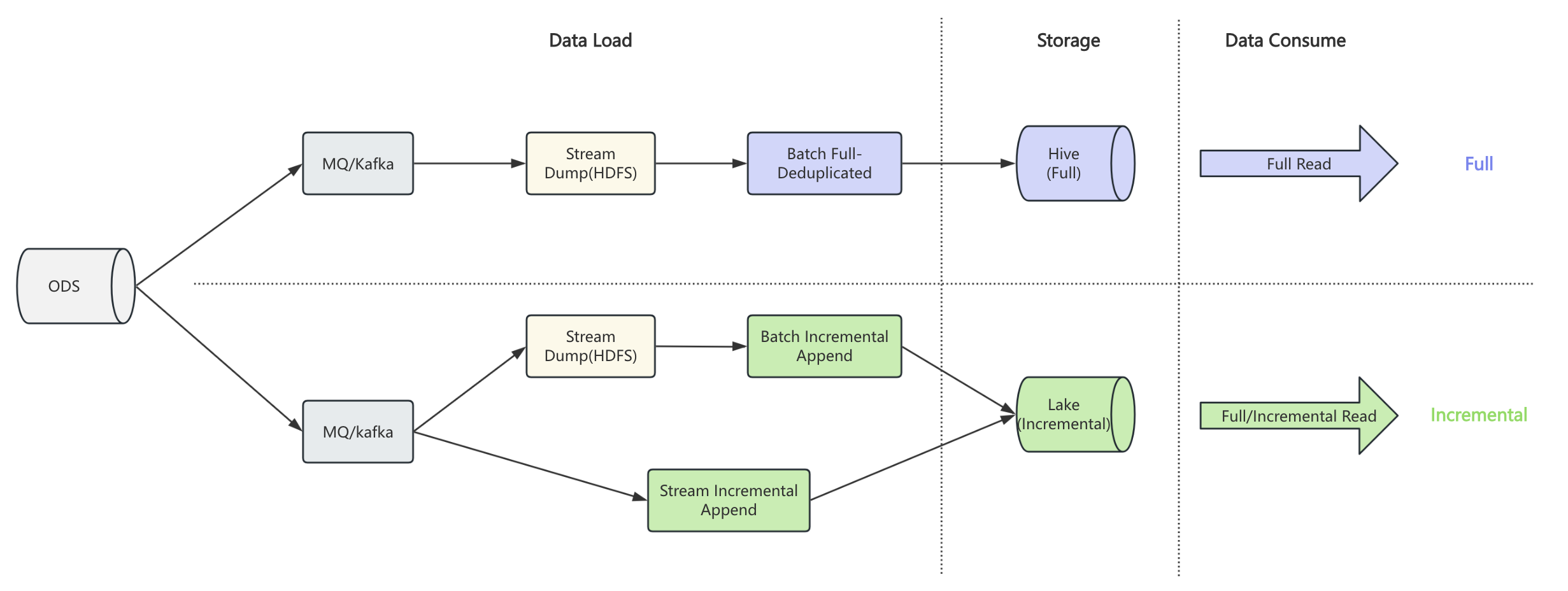
Based on the regular table, chain table introduces snapshot and delta branches to represent full and incremental data respectively. When writing, you specify the branch to write full or incremental data. When reading, paimon automatically chooses the appropriate strategy based on the read mode, such as full, incremental, or hybrid.
To enable chain table, you must config chain-table.enabled to true in the table options when creating the
table, and the snapshot and delta branch need to be created as well. Consider an example via Spark SQL:
CREATE TABLE default.t (
    `t1` string ,
    `t2` string ,
    `t3` string
) PARTITIONED BY (`date` string)
TBLPROPERTIES (
  'chain-table.enabled' = 'true',
  -- props about primary key table
  'primary-key' = 'date,t1',
  'sequence.field' = 't2',
  'bucket-key' = 't1',
  'bucket' = '2',
  -- props about partition
  'partition.timestamp-pattern' = '$date',
  'partition.timestamp-formatter' = 'yyyyMMdd'
);

CALL sys.create_branch('default.t', 'snapshot');

CALL sys.create_branch('default.t', 'delta');

ALTER TABLE default.t SET tblproperties
    ('scan.fallback-snapshot-branch' = 'snapshot',
     'scan.fallback-delta-branch' = 'delta');

ALTER TABLE `default`.`t$branch_snapshot` SET tblproperties
    ('scan.fallback-snapshot-branch' = 'snapshot',
     'scan.fallback-delta-branch' = 'delta');

ALTER TABLE `default`.`t$branch_delta` SET tblproperties
    ('scan.fallback-snapshot-branch' = 'snapshot',
     'scan.fallback-delta-branch' = 'delta');
Notice that:
- Chain table is only supported for primary key table, which means you should define
bucketandbucket-keyfor the table. - Chain table should ensure that the schema of each branch is consistent.
- Only spark support now, flink will be supported later.
- Chain compact is not supported for now, and it will be supported later.
- Deletion vector is not supported for chain table.
After creating a chain table, you can read and write data in the following ways.
- Full Write: Write data to t$branch_snapshot.
insert overwrite `default`.`t$branch_snapshot` partition (date = '20250810')
    values ('1', '1', '1');
- Incremental Write: Write data to t$branch_delta.
insert overwrite `default`.`t$branch_delta` partition (date = '20250811')
    values ('2', '1', '1');
- Full Query: If the snapshot branch has full partition, read it directly; otherwise, read on chain merge mode.
select t1, t2, t3 from default.t where date = '20250811'
you will get the following result:
+---+----+-----+
| t1|  t2|   t3|
+---+----+-----+
| 1 |   1|   1 |
| 2 |   1|   1 |
+---+----+-----+
- Incremental Query: Read the incremental partition from t$branch_delta
select t1, t2, t3 from `default`.`t$branch_delta` where date = '20250811'
you will get the following result:
+---+----+-----+
| t1|  t2|   t3|
+---+----+-----+
| 2 |   1|   1 |
+---+----+-----+
- Hybrid Query: Read both full and incremental data simultaneously.
select t1, t2, t3 from default.t where date = '20250811'
union all
select t1, t2, t3 from `default`.`t$branch_delta` where date = '20250811'
you will get the following result:
+---+----+-----+
| t1|  t2|   t3|
+---+----+-----+
| 1 |   1|   1 |
| 2 |   1|   1 |
| 2 |   1|   1 |
+---+----+-----+
Group Partition #
In real-world scenarios, a table often has multiple partition dimensions. For example, data may be
partitioned by both region and date. In such cases, different regions are independent data silos —
each should maintain its own chain independently rather than sharing one global chain across all regions.
Paimon supports this pattern via group partition: partition keys are divided into two parts:
- Group partition keys (prefix fields): Dimensions that identify independent data silos (e.g.,
region). Each distinct combination of group partition values forms its own independent chain. - Chain partition keys (suffix fields): Dimensions that form the time-ordered chain within a group
(e.g.,
date).
Use chain-table.chain-partition-keys to specify the chain dimension. This value must be a
contiguous suffix of the table’s partition keys. Partition fields before it automatically become the
group dimension. If this option is not set, all partitions belong to a single implicit group (the
default behavior for single-dimension partitioned tables).
Consider an example where the table is partitioned by region and date, and you want each region to
have its own chain:
CREATE TABLE default.t (
    `t1` string ,
    `t2` string ,
    `t3` string
) PARTITIONED BY (`region` string, `date` string)
TBLPROPERTIES (
  'chain-table.enabled' = 'true',
  'primary-key' = 'region,date,t1',
  'sequence.field' = 't2',
  'bucket-key' = 't1',
  'bucket' = '2',
  'partition.timestamp-pattern' = '$date',
  'partition.timestamp-formatter' = 'yyyyMMdd',
  -- specify that only `date` is the chain dimension; `region` becomes the group dimension
  'chain-table.chain-partition-keys' = 'date'
);
With this configuration:
- Partition keys:
[region, date] - Group partition keys:
[region]— CN and US each have their own independent chain - Chain partition keys:
[date]— time-ordered chain within each region
When reading a partition like (region='CN', date='20250811'), Paimon finds the nearest earlier
snapshot partition within the same region (e.g., (region='CN', date='20250810')) as the chain
anchor, and merges forward through the delta data for the CN group only. The US group is resolved
independently using its own anchor.
For hourly partitioned tables with a regional dimension, you can set both dt and hour as chain
partition keys:
'chain-table.chain-partition-keys' = 'dt,hour'
This treats (dt, hour) as the composite chain dimension and everything before it (e.g., region) as
the group dimension.