Basic Concepts
A Paimon table combines a schema, a history of snapshots, and the files referenced by those snapshots. This page introduces the logical table first, then explains how it maps to storage.
Table Types
| Table type | Logical behavior | Typical use |
|---|---|---|
| Append table | Stores incoming rows without merging them by primary key. | Event logs and batch datasets |
| Primary-key table | Merges records with the same key according to the configured merge engine. | CDC, upserts, and updates to an entity |
A primary-key table can keep multiple physical versions of a record. Reads and compaction reconcile those versions to produce the logical result. An append table does not merge incoming records by key; supported engines can still perform batch row-level operations.
Multimodal tables add storage capabilities for data such as BLOBs and vectors. The REST Catalog table guide also describes Format Tables and Object Tables, which expose other kinds of stored data through the catalog.
Catalog and Schema
A catalog organizes databases and tables so engines can use names such as
my_catalog.my_database.my_table. The table schema defines field names and types, partition
keys, primary keys, and options. Schema versions let readers interpret data written before a
schema change. See Data Types and the schema specification.
Partition
Partitions divide a table by column values, such as dt=2026-09-10. A table can have one or more
partition keys, or be unpartitioned. Partition filters let readers skip unrelated partitions
and let maintenance jobs target a subset of the table.
Choose partition keys based on how you filter and manage data. For primary-key tables, also consider the constraints on cross-partition updates.
Bucket
A bucket groups files within a partition. Its role depends on the table's bucket mode:
- Fixed buckets distribute records by a hash of the bucket key.
- Dynamic buckets assign keys to buckets and track the assignment in an index for primary-key tables.
- Bucket-unaware append tables use a
bucket-0directory without tying writer parallelism to a fixed bucket count.
See primary-key data distribution for the complete set of modes and bucketed append tables for append-table choices.
File Layouts
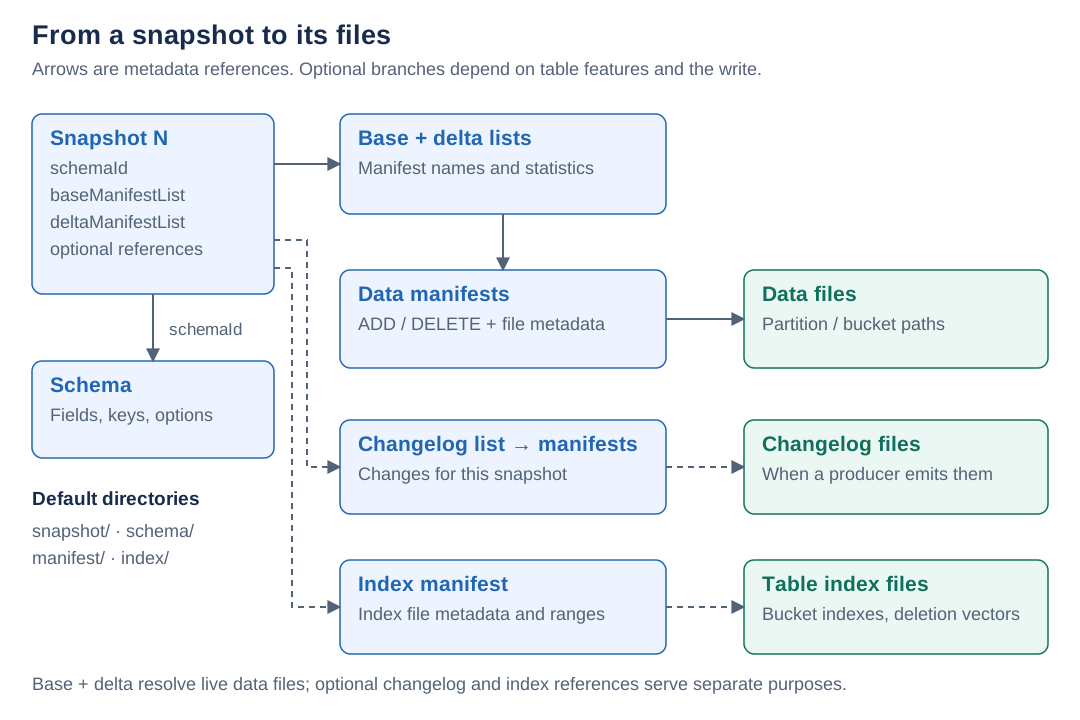
A table normally stores its files beneath a table directory. Data files can also use configured external paths. Readers use metadata references to find the correct files; a directory listing alone does not tell you which files belong to the current table state.
Read a Snapshot
- Select a snapshot, usually the latest one or a retained snapshot requested for time travel.
- Use its schema and manifest references to interpret the table state.
- Combine the base and delta manifests to identify live data files. Use partition and file statistics to skip files that cannot match the query.
- Read the selected data files, applying the table's merge behavior and indexes as required.
The storage specification gives directory examples and the fields stored in each metadata file.
Snapshot
A snapshot captures a committed table state. For filesystem-based snapshot storage, the
snapshot directory contains JSON files named snapshot-<id>. A snapshot references a schema,
manifest lists, and optional changelog and index metadata.
Publishing a snapshot makes its changes visible together. Earlier snapshots can still reference files that a later snapshot has replaced. Time travel requires those snapshots and their files to remain available; see Manage Snapshots.
Manifest Files
Manifest lists and manifests are stored in the manifest directory.
- A manifest list records manifest file names and metadata, including partition statistics.
- A data manifest records additions and deletions of data files, together with file metadata such as row counts and statistics. Changelog manifests describe changelog files.
- An index manifest records table index files, such as dynamic bucket indexes and deletion vectors.
A deletion in a manifest removes a file from the logical table state. It does not immediately delete that file from storage. Snapshot expiration can remove files once they are no longer needed.
Data Files
Data files contain the records. Parquet is the default format; see File Format for the available formats and type mappings. Primary-key data files also carry information used to merge records, such as row kind and sequence number.
Compaction replaces a set of data files with a new set. It can consolidate small files and, for primary-key tables, merge record versions. Changelog files serve incremental readers when the configured changelog producer generates them.
Follow a Record Through Snapshots
For a primary-key table using merge-engine = deduplicate, a newer record for a key replaces
the older value in the logical result. The files can still contain both versions until compaction.
This simplified history follows one key, 42:
| Snapshot | Change | Live data files | Batch query result for key 42 |
|---|---|---|---|
| 1 | Write (42, 10) to file A. | A | (42, 10) |
| 2 | Write the newer value (42, 20) to file B. | A, B | (42, 20) |
| 3 | Compact A and B into file C. | C | (42, 20) |
Snapshot 3 replaces the file set without changing the query result. A reader using snapshot 1
still needs file A and sees (42, 10). Physical deletion must therefore wait until retention no
longer requires that file. See snapshot expiration.
Consistency Guarantees
Writers prepare files before publishing a snapshot. A reader of that snapshot sees its committed file set rather than a partially published set of files. One write transaction can produce separate append and compaction snapshots; a compaction-only operation can produce a single snapshot, and an empty commit can be skipped.
Concurrent writers validate their changes against the current table state. Snapshot publication requires an atomic commit mechanism, and competing file changes can still cause a commit to fail. Read Concurrency Control before configuring multiple writers.