REST Catalog
The REST Catalog is a Paimon catalog client that talks to a remote service over HTTP. The service implements the REST Catalog API and owns the backend-specific catalog logic. Compute engines use the client to discover tables and perform catalog operations.
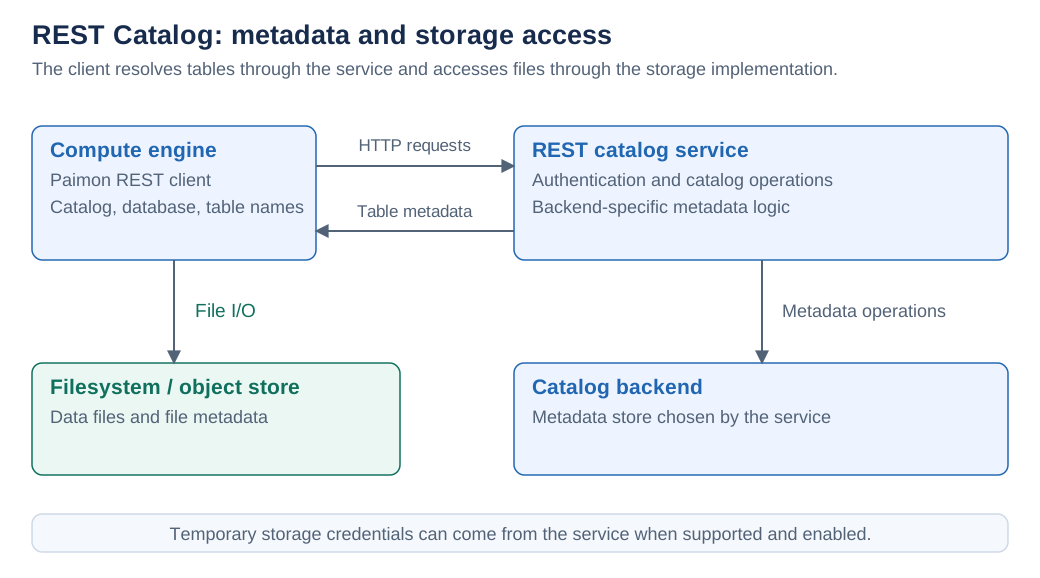
How It Works
- The client connects to the service URI and identifies the warehouse to use.
- The service authenticates requests and handles database, table, and other supported metadata operations.
- The client obtains table metadata and accesses files through the configured filesystem or object store. When supported and enabled, the service can provide temporary data-access credentials.
The catalog service does not need to proxy the contents of every data file. Catalog API access and storage access are separate parts of the connection. Server capabilities determine which optional table, permission, policy, and snapshot operations are available.
Connect an Engine
Configure metastore = rest, the service uri, the warehouse, and an authentication provider.
For REST Catalog, the warehouse identifies the server-side catalog or instance; use the value
expected by your service rather than assuming it is a filesystem path.
Choose the authentication guide for your service:
| Provider | Guide |
|---|---|
Bearer token (token.provider = bear) | Bearer Token, including a Flink SQL catalog example |
Alibaba Cloud DLF (token.provider = dlf) | DLF Token, including access keys, STS, and ECS roles |
Work with Tables and Files
| Task | Guide |
|---|---|
| Understand Paimon Tables, Format Tables, and Object Tables | Tables |
| Access files using catalog, database, and table names | Paimon Virtual Storage |
| Use the catalog from Java | REST Java API |
API References
- REST Catalog API: the OpenAPI contract for catalog operations.
- REST Management API: permissions, row filters, column masking, and the corresponding Spark SQL procedures.
These references describe the client/server contracts. Check that your server implements an operation before relying on it.