Chain Table
Chain table is a new capability for primary key tables that transforms how you process incremental data. Imagine a scenario where you periodically store a full snapshot of data (for example, once a day), even though only a small portion changes between snapshots. ODS binlog dump is a typical example of this pattern.
Taking a daily binlog dump job as an example. A batch job merges yesterday's full dataset with today's incremental changes to produce a new full dataset. This approach has two clear drawbacks:
- Full computation: Merge operation includes all data, and it will involve shuffle, which results in poor performance.
- Full storage: Store a full set of data every day, and the changed data usually accounts for a very small proportion.
Paimon addresses this problem by directly consuming only the changed data and performing merge-on-read. In this way, full computation and storage are turned into incremental mode:
- Incremental computation: The offline ETL daily job only needs to consume the changed data of the current day and do not require merging all data.
- Incremental Storage: Only store the changed data each day, and asynchronously compact it periodically (e.g., weekly) to build a global chain table within the lifecycle.
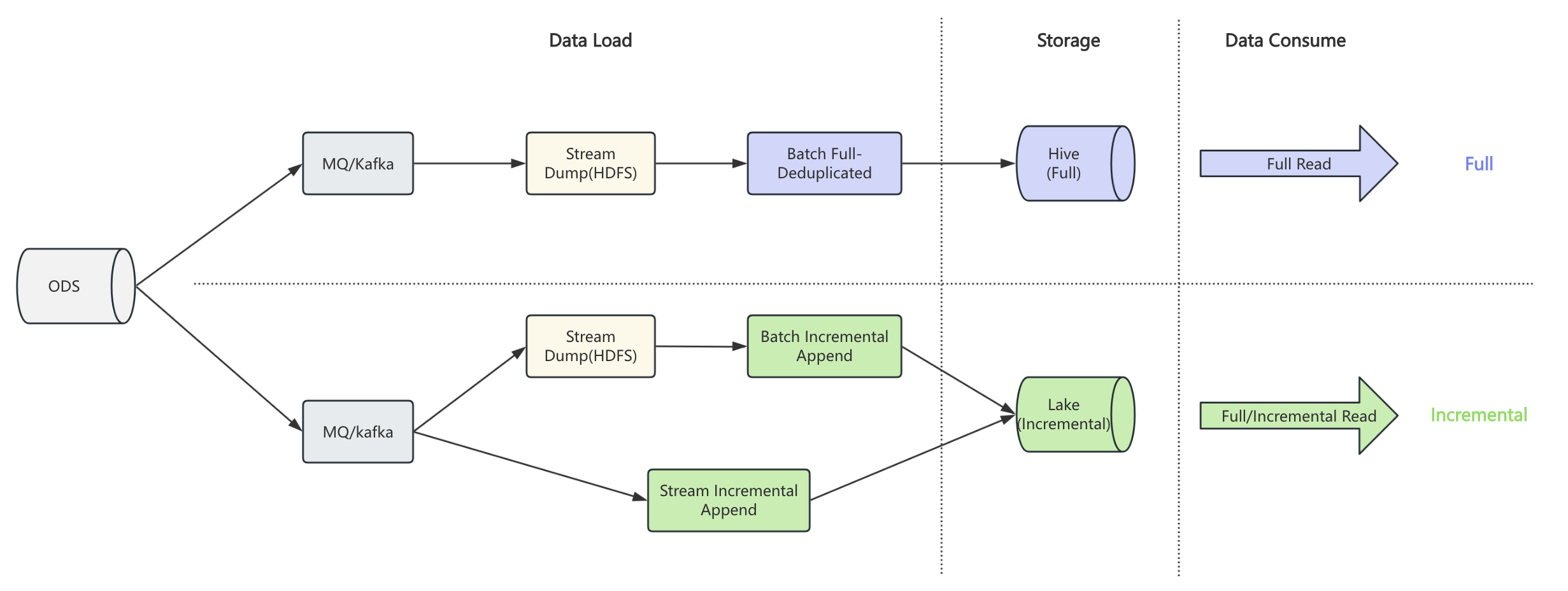
Based on the regular table, chain table introduces snapshot and delta branches to represent full and incremental data respectively. When writing, you specify the branch to write full or incremental data. When reading, paimon automatically chooses the appropriate strategy based on the read mode, such as full, incremental, or hybrid.
To enable chain table, you must config chain-table.enabled to true in the table options when creating the
table, and the snapshot and delta branch need to be created as well.
- Spark SQL
- Flink SQL
CREATE TABLE default.t (
`t1` string ,
`t2` string ,
`t3` string
) PARTITIONED BY (`date` string)
TBLPROPERTIES (
'chain-table.enabled' = 'true',
-- props about primary key table
'primary-key' = 'date,t1',
'sequence.field' = 't2',
'bucket-key' = 't1',
'bucket' = '2',
-- props about partition
'partition.timestamp-pattern' = '$date',
'partition.timestamp-formatter' = 'yyyyMMdd'
);
CALL sys.create_branch('default.t', 'snapshot');
CALL sys.create_branch('default.t', 'delta');
ALTER TABLE default.t SET tblproperties
('scan.fallback-snapshot-branch' = 'snapshot',
'scan.fallback-delta-branch' = 'delta');
ALTER TABLE `default`.`t$branch_snapshot` SET tblproperties
('scan.fallback-snapshot-branch' = 'snapshot',
'scan.fallback-delta-branch' = 'delta');
ALTER TABLE `default`.`t$branch_delta` SET tblproperties
('scan.fallback-snapshot-branch' = 'snapshot',
'scan.fallback-delta-branch' = 'delta');
CREATE TABLE default.t (
`t1` STRING,
`t2` STRING,
`t3` STRING,
`date` STRING
) PARTITIONED BY (`date`) WITH (
'chain-table.enabled' = 'true',
'primary-key' = 'date,t1',
'sequence.field' = 't2',
'bucket-key' = 't1',
'bucket' = '2',
'partition.timestamp-pattern' = '$date',
'partition.timestamp-formatter' = 'yyyyMMdd'
);
CALL sys.create_branch('default.t', 'snapshot');
CALL sys.create_branch('default.t', 'delta');
ALTER TABLE default.t SET (
'scan.fallback-snapshot-branch' = 'snapshot',
'scan.fallback-delta-branch' = 'delta');
ALTER TABLE `default`.`t$branch_snapshot` SET (
'scan.fallback-snapshot-branch' = 'snapshot',
'scan.fallback-delta-branch' = 'delta');
ALTER TABLE `default`.`t$branch_delta` SET (
'scan.fallback-snapshot-branch' = 'snapshot',
'scan.fallback-delta-branch' = 'delta');
Notice that:
- Chain table is only supported for primary key table, which means you should define
bucketandbucket-keyfor the table. - Chain table should ensure that the schema of each branch is consistent.
- Deletion vector is not supported for chain table.
- The delta branch must use the
DEDUPLICATEmerge engine (default) if you plan to use streaming read or lookup join. Other merge engine types are not supported on the delta branch for these incremental read paths. Batch read is not affected.
After creating a chain table, you can read and write data in the following ways.
- Full Write: Write data to t$branch_snapshot.
insert overwrite `default`.`t$branch_snapshot` partition (date = '20250810')
values ('1', '1', '1');
- Incremental Write: Write data to t$branch_delta.
insert overwrite `default`.`t$branch_delta` partition (date = '20250811')
values ('2', '1', '1');
- Full Query: If the snapshot branch has full partition, read it directly; otherwise, read on chain merge mode.
select t1, t2, t3 from default.t where date = '20250811'
you will get the following result:
+---+----+-----+
| t1| t2| t3|
+---+----+-----+
| 1 | 1| 1 |
| 2 | 1| 1 |
+---+----+-----+
- Incremental Query: Read the incremental partition from t$branch_delta
select t1, t2, t3 from `default`.`t$branch_delta` where date = '20250811'
you will get the following result:
+---+----+-----+
| t1| t2| t3|
+---+----+-----+
| 2 | 1| 1 |
+---+----+-----+
- Hybrid Query: Read both full and incremental data simultaneously.
select t1, t2, t3 from default.t where date = '20250811'
union all
select t1, t2, t3 from `default`.`t$branch_delta` where date = '20250811'
you will get the following result:
+---+----+-----+
| t1| t2| t3|
+---+----+-----+
| 1 | 1| 1 |
| 2 | 1| 1 |
| 2 | 1| 1 |
+---+----+-----+
- Chain Table Compaction: Merge data from snapshot and delta branches into the snapshot branch.
This is useful for periodically compacting incremental data into full snapshots.
You can use the
compact_chain_tableprocedure to merge a specific partition:
CALL sys.compact_chain_table(table => 'default.t', partition => 'date="20250811"');
After compaction, the data in the snapshot branch will contain the merged result from both snapshot and delta branches, and subsequent queries will benefit from direct snapshot access without merge-on-read overhead.
select t1, t2, t3 from `default`.`t$branch_snapshot` where date = '20250811';
you will get the following result:
+---+----+-----+
| t1| t2| t3|
+---+----+-----+
| 1 | 1| 1 |
| 2 | 1| 1 |
+---+----+-----+
Streaming Read
Chain tables support Flink streaming read. A streaming read job operates in two phases:
- Full load phase: Produces a full result by reading the latest snapshot partition (per group) and delta partitions that come after it. For each partition group, only the most recent snapshot partition is included — older snapshot partitions are considered outdated and excluded.
- Incremental phase: Continuously reads new commits from the delta branch as they arrive.
Write-Side Requirements
Streaming read assumes the chain table follows the standard write pattern described at the top of this page:
- Snapshot branch receives periodic full data (e.g., a daily ODS binlog dump job writes via
INSERT OVERWRITE t$branch_snapshot). Each snapshot partition represents a complete view of the data at that point in time. - Delta branch receives incremental changes between snapshots (e.g., a batch job writes the
current day's new/updated records via
INSERT INTO t$branch_delta). Each delta partition contains only the changes for that period.
The streaming read relies on this pattern to produce correct results. After the full load phase, only new delta branch commits are picked up — writes to the snapshot branch do not trigger streaming output. To incorporate a new snapshot, restart the streaming job.
Usage
SET 'execution.runtime-mode' = 'streaming';
INSERT INTO downstream_sink SELECT * FROM default.t;
Limitations
- The incremental phase only monitors the delta branch. Writes to the snapshot branch are not detected until the streaming job is restarted.
- The chain-table-aware streaming scan only supports the default startup mode (
latest-full). When the user specifies an explicit starting position — such asscan.snapshot-id,scan.timestamp-millis,scan.mode = 'latest', orconsumer-id— anUnsupportedOperationExceptionis thrown. To use standard streaming read without chain table logic, read from a specific branch table (e.g.,t$branch_delta) instead of the main table. - Partition filters are not supported in chain table streaming reads. Specifying a partition
filter — either via a
WHEREclause on partition columns or thescan.partitionstable option — throws anUnsupportedOperationException. This is because the chain table streaming scan determines which partitions to read based on the chain-merge logic across snapshot and delta branches, and applying a partition filter would interfere with this logic. To read a specific partition, use batch mode instead. - The delta branch must use the
DEDUPLICATEmerge engine (default). Other merge engine types are not supported.
Lookup Join
Chain tables support Flink lookup joins. When used as a dimension table, the lookup join reflects the latest state of the chain table: the most recent snapshot partition per group, combined with delta partitions that come after it. Older snapshot partitions are considered outdated and excluded. After the initial load, new delta branch writes become visible through periodic incremental refresh.
SELECT
orders.order_id,
dim.product_name
FROM orders
LEFT JOIN dim /*+ OPTIONS('continuous.discovery-interval' = '5s') */
FOR SYSTEM_TIME AS OF orders.proc_time AS dim
ON orders.product_id = dim.product_id;
The incremental refresh only monitors the delta branch. Writes to the snapshot branch are not detected until the lookup join job is restarted.
Limitations
- The incremental refresh only monitors the delta branch. Writes to the snapshot branch are not detected until the lookup join job is restarted.
- Join key must not contain partition keys. Chain table's partition model spans two branches (snapshot + delta) with anchor-based merging, making partition-level routing unreliable for lookup joins. If partition keys appear in the join condition, an error will be raised.
- Partition filters are not supported in chain table lookup joins. Specifying a
partition filter via the
scan.partitionstable option throws anUnsupportedOperationException. This is because the chain table lookup scan determines which partitions to read based on the chain-merge logic across snapshot and delta branches, and applying a partition filter would interfere with this logic. - The chain-table-aware lookup scan only supports the default startup mode
(
latest-full). When the user specifies an explicit starting position — such asscan.snapshot-id,scan.timestamp-millis,scan.mode = 'latest', orconsumer-id— anUnsupportedOperationExceptionis thrown. lookup.cachemust beAUTOorFULL. Other cache modes are not supported for chain tables.- The delta branch must use the
DEDUPLICATEmerge engine (default). Other merge engine types are not supported.
Group Partition
In real-world scenarios, a table often has multiple partition dimensions. For example, data may be
partitioned by both region and date. In such cases, different regions are independent data silos —
each should maintain its own chain independently rather than sharing one global chain across all regions.
Paimon supports this pattern via group partition: partition keys are divided into two parts:
- Group partition keys (prefix fields): Dimensions that identify independent data silos (e.g.,
region). Each distinct combination of group partition values forms its own independent chain. - Chain partition keys (suffix fields): Dimensions that form the time-ordered chain within a group
(e.g.,
date).
Use chain-table.chain-partition-keys to specify the chain dimension. This value must be a
contiguous suffix of the table's partition keys. Partition fields before it automatically become the
group dimension. If this option is not set, all partitions belong to a single implicit group (the
default behavior for single-dimension partitioned tables).
Consider an example where the table is partitioned by region and date, and you want each region to
have its own chain:
CREATE TABLE default.t (
`t1` string ,
`t2` string ,
`t3` string
) PARTITIONED BY (`region` string, `date` string)
TBLPROPERTIES (
'chain-table.enabled' = 'true',
'primary-key' = 'region,date,t1',
'sequence.field' = 't2',
'bucket-key' = 't1',
'bucket' = '2',
'partition.timestamp-pattern' = '$date',
'partition.timestamp-formatter' = 'yyyyMMdd',
-- specify that only `date` is the chain dimension; `region` becomes the group dimension
'chain-table.chain-partition-keys' = 'date'
);
With this configuration:
- Partition keys:
[region, date] - Group partition keys:
[region]— CN and US each have their own independent chain - Chain partition keys:
[date]— time-ordered chain within each region
When reading a partition like (region='CN', date='20250811'), Paimon finds the nearest earlier
snapshot partition within the same region (e.g., (region='CN', date='20250810')) as the chain
anchor, and merges forward through the delta data for the CN group only. The US group is resolved
independently using its own anchor.
For hourly partitioned tables with a regional dimension, you can set both dt and hour as chain
partition keys:
'chain-table.chain-partition-keys' = 'dt,hour'
This treats (dt, hour) as the composite chain dimension and everything before it (e.g., region) as
the group dimension.
Partition Expiration
Chain tables support automatic partition expiration via the standard partition.expiration-time option.
However, the expiration algorithm differs from normal tables to preserve chain integrity.
How It Works
In a normal table, every partition older than the cutoff (now - partition.expiration-time) is dropped
independently. Chain tables cannot do this because a delta partition depends on its nearest earlier
snapshot partition as an anchor for merge-on-read. Dropping the anchor would break the chain.
Chain table expiration works in segments. A segment consists of one snapshot partition and all the delta partitions whose time falls between that snapshot and the next snapshot in sorted order. The segment is the atomic unit of expiration: either the entire segment is expired, or nothing in it is.
The algorithm per group:
- List all snapshot branch partitions sorted by chain partition time.
- Filter to those before the cutoff (
now - partition.expiration-time). - If fewer than 2 snapshots are before the cutoff, nothing can be expired — the only one must be kept as the anchor.
- The most recent snapshot before the cutoff is the anchor (kept). All earlier snapshots and their associated delta partitions form expirable segments.
- Delta partitions are dropped before snapshot partitions so that the commit pre-check always passes.
For tables with group partitions, each group is processed independently. A group with many expired snapshots can have segments expired while another group with only one snapshot before the cutoff retains all of its data.
Example
ALTER TABLE default.t SET TBLPROPERTIES (
'partition.expiration-time' = '30 d',
'partition.expiration-check-interval' = '1 d'
);
ALTER TABLE `default`.`t$branch_snapshot` SET TBLPROPERTIES (
'partition.expiration-time' = '30 d',
'partition.expiration-check-interval' = '1 d'
);
ALTER TABLE `default`.`t$branch_delta` SET TBLPROPERTIES (
'partition.expiration-time' = '30 d',
'partition.expiration-check-interval' = '1 d'
);
Suppose the snapshot branch has partitions S(0101), S(0201), S(0301) and the delta branch has
D(0110), D(0210), D(0315). On 2025-03-31 with a 30-day retention the cutoff is 2025-03-01:
- Snapshots before cutoff:
S(0101),S(0201). Anchor =S(0201)(kept). - Segment 1 expired:
S(0101)+D(0110)(delta betweenS(0101)andS(0201)). - Remaining:
S(0201),S(0301),D(0210),D(0315).
Important Notes
- Delta-only groups are not expired. If a group has delta partitions but no snapshot partition, its deltas are the only copy of that group's data. Partition expiration will not touch them. They will start to be expired once at least two snapshot partitions exist for the group and fall before the cutoff.
- Conflict detection is anchor-aware. When
partition.expiration-strategyisvalues-time, the conflict detection during writes correctly recognizes that anchor partitions are retained and does not reject writes to them. - The
partition.expiration-timeandpartition.expiration-check-intervaloptions should be set consistently across the main table and both branches.